

The visual layer of a website, images, CSS color definitions, and web fonts, controls the metric that determines whether users stay or leave. Web performance optimization focused on images and the broader design pipeline is the highest-leverage intervention available to any development team in 2025.
Conversion rates drop 4.42% for every additional second of load time in the first five seconds of a page request. That figure comes from Portent’s analysis of 94 million pageviews across ten ecommerce sites, and the curve steepens on mobile. Google’s own research confirms that 53% of mobile visitors abandon a page that takes longer than three seconds to load. A Deloitte study conducted in partnership with Google quantified the other side of the equation: a 0.1-second improvement in load speed increased retail conversions by 8.4% and average order value by 9.2%.
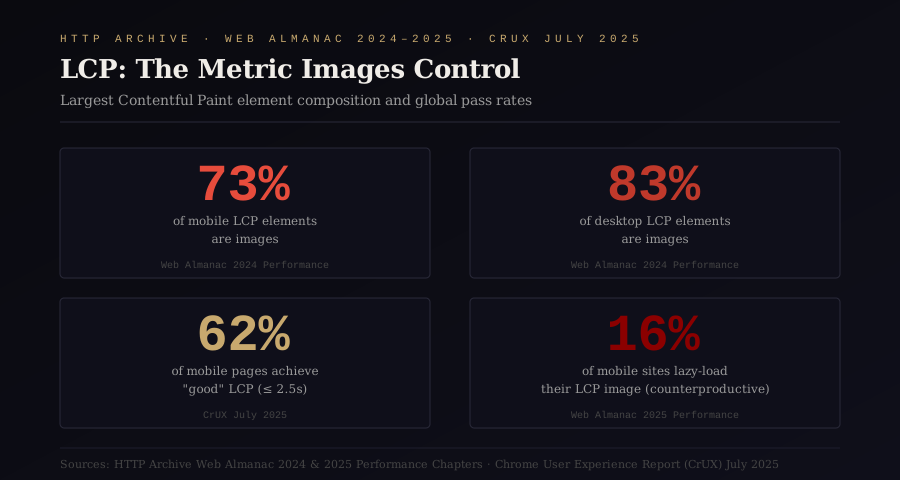
The performance metric at the center of this equation is Largest Contentful Paint, LCP, which measures the render time of the largest visible element on the page. According to the 2024 Web Almanac, images constitute the LCP element on 73% of mobile pages and 83% of desktop pages. The 2025 Web Almanac reports that only 62% of mobile pages achieve a “good” LCP score of 2.5 seconds or less. LCP remains the hardest Core Web Vital to pass globally.
The performance optimization industry has spent years focused on JavaScript bundling, server configuration, and caching strategy. These interventions matter. They are also insufficient when the visual pipeline, the combined weight and loading behavior of images, CSS, and fonts, remains unoptimized. The median desktop homepage in 2025 weighs 2.9 MB. Images alone account for a median of 1,054 KB, the heaviest single resource category on the web. Fonts add another 50 to 150 KB of render-critical payload. Redundant CSS color definitions, scattered inline hex values and duplicate custom properties, compound the problem by inflating stylesheet size and complicating maintenance.
This guide walks through the four layers of the visual pipeline and the compound effect of optimizing them simultaneously.
Why Image Formats Are the Core of Web Performance Optimization
The format in which an image is served determines its file size at equivalent visual quality. This is the single largest variable in web performance optimization for images, and the web is still getting it wrong at scale.
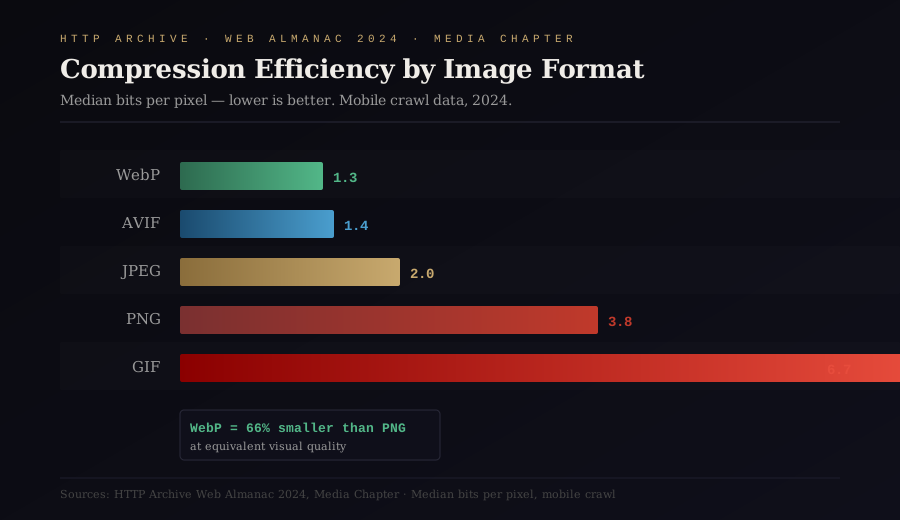
The 2024 Web Almanac’s media chapter measured bits per pixel across all crawled images. The results reveal the compression hierarchy: WebP delivers a median of 1.3 bits per pixel, AVIF achieves 1.4, JPEG sits at 2.0, PNG at 3.8, and GIF at 6.7. A PNG hero image at 3.8 bits per pixel converted to WebP at 1.3 bits per pixel loses approximately 66% of its file weight with no perceptible quality degradation.
Despite universal browser support (WebP at 95.29%, AVIF at 93.8% as of September 2025), adoption of modern formats remains slow. JPEG still accounts for 32.4% of all images served on the web, down from 40% in 2022 but still dominant. WebP has climbed to 12% of total image share, a 34% relative increase over two years. AVIF, despite a 386% relative increase in adoption, represents just 1% of all images served. When the analysis narrows to LCP images specifically, the 2025 Web Almanac Performance chapter shows JPEG at 57%, PNG at 26%, WebP at 11%, and AVIF at a marginal 0.7%.
The math is straightforward. A 200 KB JPEG hero image converted to WebP becomes approximately 130 KB. The same image in AVIF drops to roughly 100 KB. Multiply this reduction across the 17 images that the median desktop homepage loads (Web Almanac 2025 data), and the savings compound into hundreds of kilobytes reclaimed per page load.
Tools like Klara handle WebP conversion entirely client-side, processing images in the browser without uploading them to an external server. The privacy advantage is meaningful for teams handling proprietary visual assets, and the workflow eliminates the server roundtrip that makes batch conversion tedious. For teams migrating existing image libraries, Klara’s PNG-to-WebP converter processes files at 95% quality, producing outputs that are visually identical to the originals at 60-80% smaller file sizes.
The conversion itself is necessary but insufficient. Format optimization without delivery optimization leaves performance gains unrealized.
Responsive Image Delivery and the srcset Strategy That Most Sites Ignore
Serving a single image file to every device and viewport is the equivalent of shipping a desktop application to a mobile phone. The responsive image specification, built on srcset and the <picture> element, exists precisely to prevent this. Adoption is growing but far from universal: the 2024 Web Almanac found that 42% of pages use srcset (up from 33% in 2022), while only 9.3% use the <picture> element.
The srcset attribute allows the browser to choose the most appropriate image size based on device pixel ratio and viewport width. The sizes attribute refines this selection by telling the browser how wide the image will actually render. Without sizes, the browser assumes the image occupies the full viewport width, which leads to downloading images far larger than necessary on constrained layouts.
The <picture> element enables format negotiation. A single <picture> block can serve AVIF to browsers that support it, WebP as a fallback, and JPEG as the final safety net. This progressive enhancement approach captures the maximum compression benefit for each user without excluding older browsers.
A critical implementation detail that the 2025 Web Almanac flags: 16% of mobile websites apply lazy-loading to their LCP image. This is counterproductive. Lazy-loading defers the download of an image until it enters the viewport, which is exactly the wrong behavior for the largest visible element on the page. The LCP image should be prioritized, not deferred. The fetchpriority="high" attribute, whose adoption surged from 0.03% in 2022 to 15% in 2024, tells the browser to prioritize downloading the LCP resource immediately. Combining fetchpriority="high" with a properly sized srcset and a modern format through <picture> creates the optimal image delivery configuration for LCP.
The implementation pattern looks like this: identify the LCP image through Chrome DevTools or PageSpeed Insights, ensure it uses fetchpriority="high", verify that loading="lazy" is absent from it, serve it in WebP or AVIF via <picture> with JPEG fallback, and provide multiple resolutions through srcset with accurate sizes. Each of these steps removes measurable milliseconds from the LCP timeline.
How CSS Color Systems Create Hidden Performance Debt
Image optimization dominates the performance conversation because images are the heaviest resource. CSS optimization rarely enters that conversation because individual stylesheets are lighter. The compound effect of unoptimized CSS color systems, however, creates both performance debt and maintenance debt that accumulates over the lifetime of a project.
A typical production codebase contains dozens to hundreds of unique color values. These appear as inline hex codes in component files, as duplicated color definitions across multiple stylesheets, and as inconsistent naming conventions that make refactoring expensive. Every redundant color definition adds bytes to the stylesheet. More critically, inconsistent color systems cause visual inconsistency across the interface, which generates additional engineering cycles spent overriding, patching, and debugging.
The solution is a token-based color architecture: a single source of truth for all color values, exported as CSS custom properties, Tailwind configuration, SCSS variables, or JSON design tokens depending on the project’s stack. This approach reduces stylesheet size by eliminating duplication, accelerates rendering by reducing the number of unique values the browser must resolve, and eliminates the category of bugs caused by hardcoded color values that drift from the intended palette.
Building a rigorous color system requires more than selecting aesthetically pleasing hues. Every foreground-background color pair must meet WCAG contrast ratio requirements: 4.5:1 for normal text, 3:1 for large text. Manually checking contrast ratios across an entire palette is time-intensive and error-prone. IroColor automates this verification, generating accessible color palettes with built-in WCAG contrast checking and exporting the results as production-ready CSS custom properties, Tailwind configurations, and JSON tokens. The export eliminates the manual translation step between design and code, the step where inconsistencies are most commonly introduced.
The performance benefit of a well-structured color system is indirect but real. Fewer unique CSS values means a smaller stylesheet. A smaller stylesheet means faster CSSOM construction. Faster CSSOM construction means the browser reaches the rendering phase sooner, which directly reduces both FCP and LCP. For sites with large stylesheets (the median desktop page loads 7 CSS files according to the 2024 Web Almanac), this reduction compounds.
The Font Loading Strategy That 89% of Sites Still Get Wrong
Web fonts are render-critical resources. The browser cannot display text styled with a custom font until that font file has been downloaded, parsed, and applied. Every millisecond of delay in font loading translates directly into delayed text rendering, which impacts both LCP (when the LCP element is text) and CLS (when the font swap causes visible layout shift).
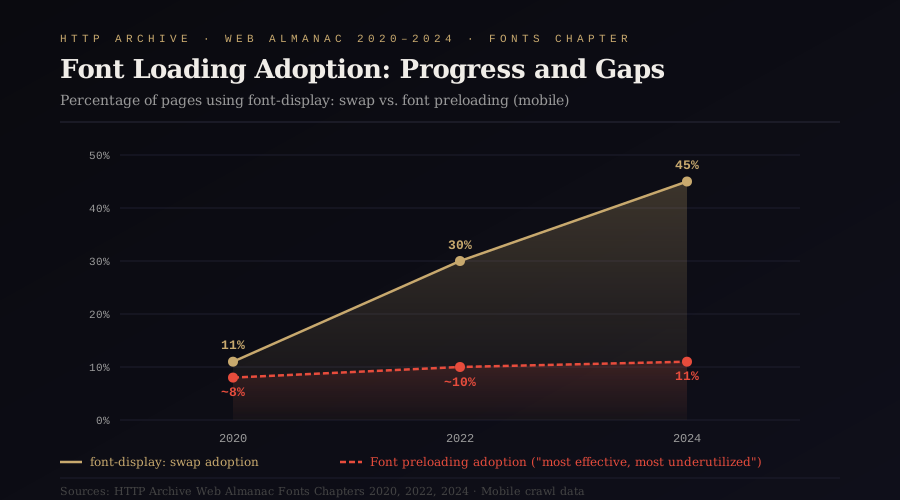
The font-display CSS descriptor controls how the browser handles the interval between requesting a font and receiving it. The value swap tells the browser to render text immediately using a fallback system font and then swap in the custom font once it loads. This prevents Flash of Invisible Text (FOIT), the phenomenon where text simply does not appear until the font downloads. Adoption of font-display: swap has grown substantially, from 11% in 2020 to 30% in 2022 to 45% in 2024, according to the Web Almanac’s fonts chapter. This growth is encouraging. It also means that 55% of sites using custom fonts are still either blocking text rendering or relying on browser defaults that produce inconsistent behavior.
The more impactful intervention is font preloading. The <link rel="preload"> directive tells the browser to begin downloading a font file before it discovers the font through CSS parsing. This can shave hundreds of milliseconds off font delivery time, particularly for fonts loaded from stylesheets that are themselves discovered late in the loading sequence. The Web Almanac 2024 reports that only 11% of pages preload their web fonts. The Almanac’s own editorial commentary calls preloading “the single most effective thing you can do to speed up font loading” and notes that it is dramatically underutilized.
The implementation requires attention to three details. First, only WOFF2 files should be preloaded. WOFF2 provides 30% better compression than WOFF and has achieved 97% browser support. Second, the crossorigin attribute must be present on the preload link, even for self-hosted fonts, because font requests always use CORS. Omitting crossorigin causes the browser to download the font twice. Third, preloading too many fonts harms performance by competing for bandwidth with other critical resources. The recommendation is to preload only the fonts required for above-the-fold content, typically one or two font files.
Font subsetting offers additional savings. A complete Latin Extended font file can exceed 100 KB. An English-language site uses a fraction of those glyphs. Subsetting strips unused characters from the font file, reducing its size by as much as 70% for single-language sites. Tools like Glyphhanger analyze page content and generate optimized subsets automatically.
The combined font optimization stack, WOFF2 format, font-display: swap or optional, <link rel="preload"> for critical fonts, and subsetting for unused glyphs, typically reduces font-related payload by 50 to 150 KB and eliminates the font loading delay as an LCP bottleneck.
The Compound Effect: Web Performance Optimization Across All Four Visual Layers

The visual pipeline is a system, and systems produce nonlinear results when multiple components improve simultaneously.
Consider a representative scenario. A page loads a 250 KB JPEG hero image that serves as the LCP element. The page also loads three web fonts totaling 120 KB, none preloaded, with no font-display declaration. The CSS contains 14 KB of stylesheets with 47 unique color values, many duplicated across components. Total visual pipeline weight: approximately 384 KB of render-critical resources, plus the time cost of sequential discovery and downloading.
After optimizing all four layers: the hero image converts to WebP at 100 KB (60% reduction) and is served with fetchpriority="high" through a <picture> element with responsive srcset. The three fonts consolidate to two WOFF2 files totaling 45 KB (62% reduction), preloaded with font-display: swap. The CSS color system consolidates to 23 unique tokens exported as custom properties, reducing stylesheet weight by approximately 3 KB and eliminating 24 overrides scattered across component files. Total visual pipeline weight: approximately 148 KB of render-critical resources.
The reduction is 61% in raw bytes. The performance improvement exceeds what the byte savings suggest, because the loading sequence has also changed. The LCP image downloads first instead of competing with lower-priority resources. Fonts render immediately through the swap fallback and preload within the first connection window. The stylesheet parses faster because it contains fewer unique values to resolve.
Vodafone’s documented case study provides real-world validation: a 31% improvement in LCP translated into an 8% increase in sales. The Economic Times improved CLS by 250% and LCP by 80%, producing a 43% reduction in bounce rate. Agrofy reduced their product page abandonment rate by 76% through Core Web Vitals optimization focused on LCP image delivery.
The visual pipeline is the performance surface that development teams have the most direct control over and the least institutional attention devoted to. Server infrastructure requires DevOps expertise. JavaScript optimization requires architectural decisions. Image conversion, responsive delivery, color system consolidation, and font loading configuration require a methodical afternoon and the right tooling.
The question worth asking is how many engineering teams have invested months in JavaScript bundler configuration while serving uncompressed PNGs, loading four font weights without preload, and scattering 60 hex values across their stylesheets.
The visual pipeline does not wait for architectural decisions. Web performance optimization starts with the images, colors, and fonts already on the page. It rewards execution today.
Sources
- HTTP Archive Web Almanac 2025, “Page Weight” chapter. https://almanac.httparchive.org/en/2025/page-weight
- HTTP Archive Web Almanac 2024, “Page Weight” chapter. https://almanac.httparchive.org/en/2024/page-weight
- HTTP Archive Web Almanac 2024, “Media” chapter. https://almanac.httparchive.org/en/2024/media
- HTTP Archive Web Almanac 2024, “Performance” chapter. https://almanac.httparchive.org/en/2024/performance
- HTTP Archive Web Almanac 2025, “Performance” chapter. https://almanac.httparchive.org/en/2025/performance
- HTTP Archive Web Almanac 2024, “Fonts” chapter. https://almanac.httparchive.org/en/2024/fonts
- Google web.dev, “Largest Contentful Paint (LCP).” https://web.dev/articles/lcp
- Google web.dev, “Best practices for fonts.” https://web.dev/articles/font-best-practices
- Google Developers, “Understanding Core Web Vitals.” https://developers.google.com/search/docs/appearance/core-web-vitals
- Portent (2022), “Site Speed is a Conversion Killer.” Analysis of 94 million pageviews across 10 ecommerce sites.
- Deloitte & Google (2020), “Milliseconds Make Millions.” Study on mobile site speed impact on consumer spend.
- Think with Google, “Mobile Page Speed Conversion Data.” https://www.thinkwithgoogle.com/marketing-strategies/app-and-mobile/mobile-page-speed-conversion-data/
- Vodafone (2021), Core Web Vitals A/B test case study. Documented via Google/Conductor.
- CaptainDNS (2025), “Median web page weight in 2025.” Analysis of HTTP Archive October 2024 data. https://www.captaindns.com/en/blog/median-web-page-weight-2025
- SpeedVitals (2025), “WebP vs AVIF.” Browser support data via caniuse.com. https://speedvitals.com/blog/webp-vs-avif/
- HTTP Archive Web Almanac 2024, “Sustainability” chapter. Image format adoption data. https://almanac.httparchive.org/en/2024/sustainability